WISDOM WAVES HUB
Practical resources for civil engineering and construction
Engineering evidence. Clear decisions.
Worked examples and editable tools for checking drawings, quantities and construction progress. Turn project evidence into a quantity, decision or report your team can act on.
Check the current drawing number, revision and scope before measuring. Recreated source: EX-DWG-001 / R02.
Select a stage above · recreated schematic, not a design
Start here
NEW / THE ENGINEERING LAB
See the evidence. Try the decision.
Explore a drawing, compare revisions, spot a discrepancy or check what is missing before issue. Small experiments with clear explanations.
Explore all four tools →Select a base and follow its dimensions into the quantity register. Compare R01 and R02, then test a what-if depth.
Open quantity explorer →How to Check a Civil BOQ Before Issue
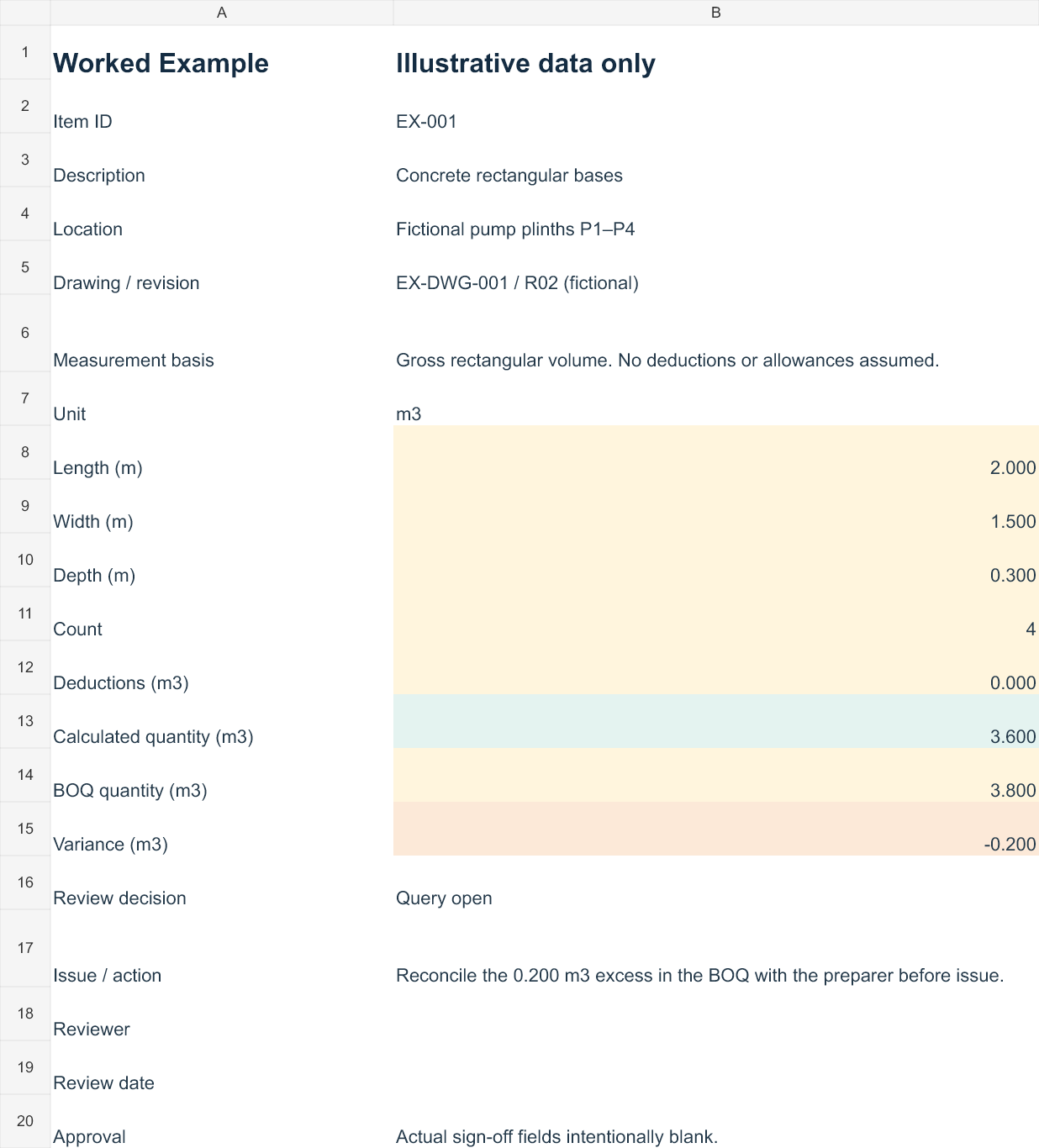
Trace drawing revisions, verify measurement and calculation, reconcile units and record review decisions. Follow a fictional concrete-base example from source reference to a review query.
An editable checklist for your next review
Four sheets for instructions, your review register, a worked example and a status summary. Start with a project copy and complete the review fields as checks are performed.
Excel .xlsx · Version 1.0 · 37 KB · Direct download
Explore the library
Start with BOQ checking. Planned coverage includes BIM coordination, tender checks and verification of AI-assisted engineering work.
Guides
Step-by-step methods with traceable inputs, checks and review decisions.
-
How to Check a Civil BOQ Before Issue
Trace current drawing revisions, verify dimensions and measurement, reconcile BOQ quantities and record review decisions using a worked concrete-base example.
Templates
Editable tools to help your team record inputs, discrepancies and completed reviews. The BOQ checklist is available now. Registers and dashboards are planned.
-
Civil BOQ Review Checklist — Excel Template
An editable four-sheet Excel workbook for source references, quantity checks, discrepancies and review status, with a fictional worked example.
Case Studies
Explore a recreated example of a concrete-base BOQ discrepancy: the source, arithmetic, review decision and remaining sign-off.
How the resources work
Check the source
Identify the drawing, specification or model revision that supports the work.
Verify the measurement or model
Trace dimensions, calculations and coordination checks back to that source.
Record the decision
Write down the discrepancy, action, responsible person and required sign-off.
Issue a usable output
Provide a clear quantity, coordinated record or report with its review status.
About Wisdom Waves Hub
Wisdom Waves Hub is a practical resource library for civil engineering and construction teams. It brings together worked examples and editable tools for site engineers, quantity surveyors, planners, BIM/MEP coordinators, contractors and project managers.
Published under the Wisdom Waves Hub name, this library covers practical quantity checking, BIM coordination and project reporting. Each resource identifies its assumptions and review status. Examples use recreated data unless project material is authorised for publication. No employer or client endorsement is implied.
Adapt examples and templates to your project requirements and obtain the relevant technical review and issue approval.
Wisdom Waves Hub
Guides · Templates · Case Studies · About